 HappyMod.net









What is HappyMod APK?
The HappyMod App is a popular third-party app store for Android devices that specializes in providing modified (MOD) versions of games and applications. Unlike official app stores like Google Play, HappyMod focuses on offering apps that have been tweaked by developers to include features not present in the original versions.
Users turn to HappyMod to gain access to premium features without payment, enjoy an uninterrupted ad-free experience, or to gain advantages in games. It serves as an alternative for users seeking enhanced functionalities that aren't available through standard app distribution channels.
The main purpose of HappyMod is to provide users with versions of apps and games that have been altered to include features that are not available in the original versions. This can include things like unlimited money, unlocked levels, free purchases, "God Mode," no ads, and other hacks or cheats. The mods available on HappyMod are typically created and uploaded by third-party developers and the user community. The community also plays a role in verifying and rating the mods to ensure they are working and safe.
What Can HappyMod App Do?
The HappyMod app serves as a third-party app store specifically designed for Android devices, primarily focusing on providing modified (MOD) versions of popular games and applications.
HappyMod allows users to download apps and games where premium features, in-app purchases, or locked content (like levels, characters, or resources such as unlimited money, gems, or lives) are already unlocked or available for free. In essence, the HappyMod app functions as a dedicated marketplace for Android users who desire modified versions of applications and games, providing a relatively organized and tested environment to acquire content that isn't available through official channels.
The mods on HappyMod are uploaded by third-party developers and the community. This means new mods are constantly being created and added. The community plays a crucial role in testing and rating the mods. Users can leave comments and feedback on an app's page to let others know if a mod works, what features it has, and if there are any issues. This helps to identify and highlight the best and most reliable mods. Users can request mods for specific apps or games they want to see on the platform.
What HappyMod Makes Gaming More Exciting?
HappyMod makes gaming more exciting by breaking down traditional barriers and offering players a new, enhanced way to experience their favorite titles.
In essence, HappyMod transforms the gaming experience by giving players unprecedented control and immediate access to the "best parts" of a game, making every session feel more powerful, limitless, and inherently more exciting.
Nice UI Design
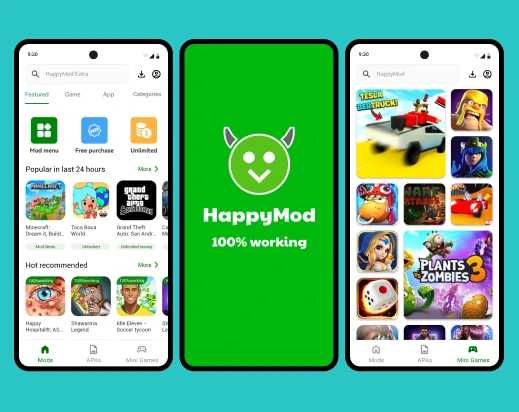
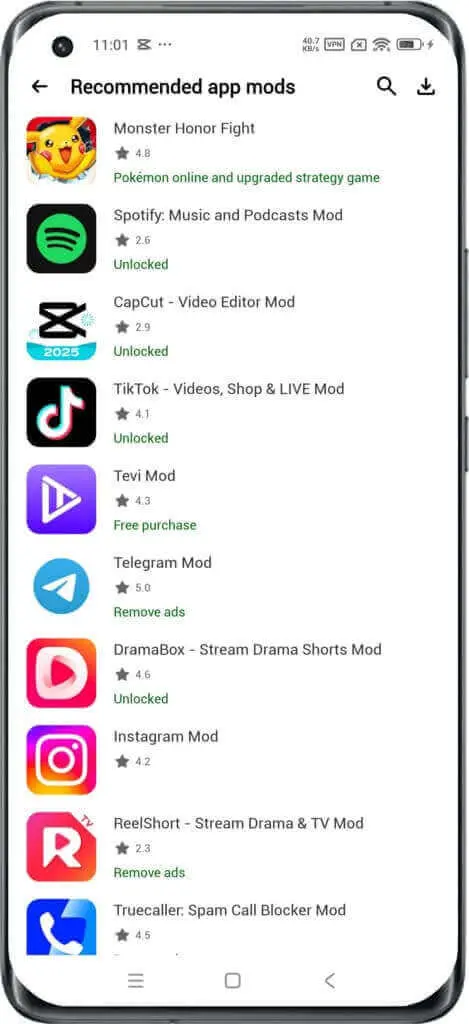
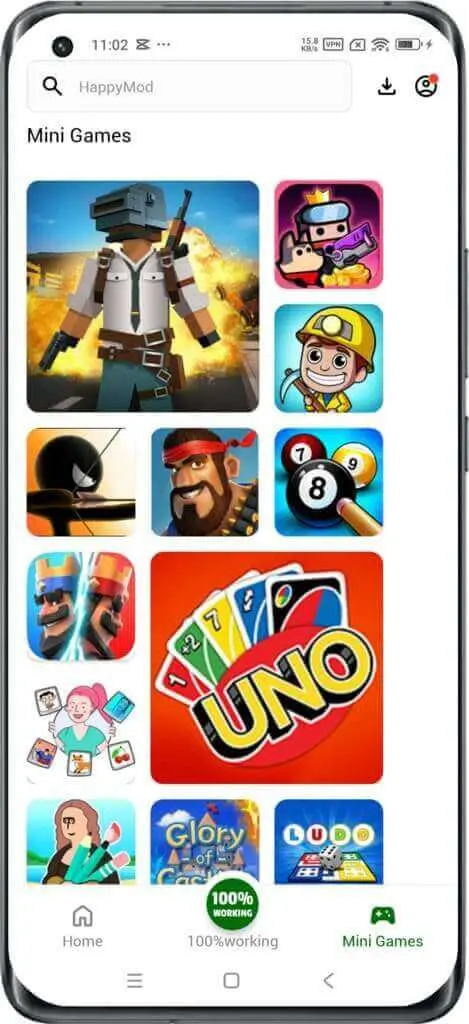
HappyMod's UI design is primarily focused on simplicity, functionality, and user-friendliness, aiming to provide a straightforward experience for discovering and downloading modified Android applications and games.The interface typically features a clean, uncluttered layout that allows users to easily navigate through various sections without confusion. This prioritizes content discovery.A central search bar is usually a key element, enabling users to quickly find specific apps or games they are looking for.In summary, HappyMod's UI design is geared towards maximizing the ease of finding, understanding, and installing modded APKs, emphasizing a practical and direct approach to content delivery.
Why Users Need HappyMod App
Free Access to Premium Features
Users can access paid or locked features, content, and in-app purchases (like unlimited currency or unlocked levels) without cost.
Ad-Free Experience
Many mods remove intrusive advertisements, providing a smoother and more enjoyable app or game experience.
Enhanced Gameplay
Gamers can enjoy advantages such as invincibility, higher damage, or unlocked characters, which can make games more fun or less frustrating.
Bypassing Restrictions
It helps users bypass geographical restrictions or specific limitations imposed by original app developers.
Finding Specific/Older Versions
Users can find and download older versions of apps for compatibility reasons or to access features removed in newer updates.
Centralized & Safer Mod Source
HappyMod provides a relatively organized and tested platform for mods, reducing the risk of downloading malware or non-functional files from random internet sources.
Features of HappyMod APK
Here are the detailed features of the HappyMod APK, broken down into multiple points
Vast Library of Modded APKs
HappyMod boasts an extensive collection of over 200,000 modified Android applications and games. This encompasses a wide variety of genres and categories.
Focus on Mods
The primary focus is on providing modified versions (Mods) of existing apps, offering enhanced or unlocked features not available in the original versions.
Regularly Updated Content
The platform's library is continuously updated with new mods and updates to existing ones, ensuring users have access to the latest modified content.
The vast majority of new content on HappyMod comes from its user community. When a new version of an app or game is released on the official app store, mod developers and skilled users create new modded versions and upload them to HappyMod. This ensures that the platform keeps pace with the latest official releases.

Diverse Mod Categories
MODs often come in various forms, including unlimited in-game currency, unlocked premium features, ad-free experiences, enhanced abilities, and more, catering to different user preferences.
Original APKs Available
Besides mods, HappyMod also provides access to the original, untouched APK files of many applications and games for users who prefer the standard experience.
User-Uploaded Content
A significant portion of the mods available on HappyMod are uploaded and shared by the user community, contributing to the vastness of the library.
Because the content is community-driven and constantly being updated, users can often find a modified version of a game or app very soon after an official update is released. However, this also means that some mods may be outdated or not work as intended, which is why the community feedback and rating system is so important.

Community-Driven Testing
The platform often incorporates user feedback and testing, with users able to comment on and rate the functionality and safety of different mods.
Manual Testing by Editors
HappyMod claims that all mods undergo manual testing by their team of editors to ensure they are working and as described.
Antivirus Scanning
Each APK file, both original and modified, is reportedly scanned with over 50 different antivirus programs before being made available for download, aiming to minimize the risk of malware.
HappyMod is an alternative app store, and like many such platforms, it understands that a major concern for users is the presence of malware in downloaded files. To address this, HappyMod claims to implement an antivirus scanning process for the content on its platform. HappyMod's official stance, and what is widely reported by users and third-party reviews, is that they scan all uploaded files for viruses and malware before making them available for download. They state that they use multiple antivirus engines to check the APKs. Some sources claim this involves scanning with over 30 different antivirus programs.
User Feedback as a Safety Indicator
User comments and ratings provide insights into the safety and functionality of specific mods, helping other users make informed decisions.
Dedicated Download and Upload Servers
HappyMod utilizes its own servers for hosting and distributing APK files, potentially offering more control over the download process.
User-Friendly Interface
The app features a clean and intuitive interface, making it easy for users to navigate, search for apps, and browse categories.
HappyMod is designed with a user-friendly interface that mimics the look and feel of official app stores like the Google Play Store. This familiarity makes it easy for new users to navigate and find the content they are looking for without a steep learning curve.One of the most user-friendly aspects of HappyMod is that you can start using it and downloading mods immediately after installation. There is no mandatory registration or login process, which removes a common barrier to entry for many users.

Efficient Search Functionality
A robust search bar allows users to quickly find specific apps or games by name.
Categorization
Apps and games are well-organized into various categories (e.g., Action, Adventure, Casual, Tools, Social), facilitating easy discovery.
Simple Installation Process
Once an APK is downloaded, the app guides users through the installation process (though users need to enable "Unknown Sources" on their Android device).
Installing and using apps from HappyMod is a straightforward process, but it requires a few extra steps compared to the official Google Play Store. This is because HappyMod is a third-party app store, and Android's security settings are designed to prevent installations from unknown sources by default. The app will then install on your device, and you'll find its icon on your home screen or in your app drawer. This whole process is designed to be user-friendly, allowing quick access to a wide range of modified applications.

Mod Information
Clear details about the specific modifications included in each modded APK are usually provided on the app's listing page.
Regular App Updates
The HappyMod app itself receives updates to improve functionality, fix bugs, and enhance the user experience.
HappyMod Vs Google Play
| HappyMod | Google Play |
|---|---|
| Specializes in Mod | Original Android apps and games |
| MOD APKs | Original APKs |
| Multi-antivirus scans | Rigorous automated scanning |
| Predominantly free access | in-app purchases |
| Install manually or via HappyMod | Direct, seamless installation |
| Focus on discovering and managing mods | Broad discovery of all types of official apps. |
| Content often submitted by users | Direct portal for official developers |
| Third-party store | Official and legitimate app market |
| Users seeking unlocked features | Users looking for official app |
What's New in HappyMod Latest Version
- What's new 3.4.0
- · Fixed known bugs and improved app stability;
- · Optimized the user interface for a smoother experience;
- · Improved performance and responsiveness;
- · Enhanced compatibility across different devices
Is Mod History Version on HappyMod Still Worth It?
Whether HappyMod's "History Version" feature is still worth it largely depends on the user's specific needs and the context of the app or game they are trying to use.
Why It's Still Worth It
- Compatibility Issues: Newer versions of apps or mods might not work correctly on older Android devices or specific older Android OS versions.
- Preference for Older Features/UI: App updates sometimes remove features users liked or introduce UI changes that are less preferred.
- Avoiding New Bugs: New updates (for both original apps and mods) can sometimes introduce new bugs or stability issues.
Why it might NOT be worth it
- Security Vulnerabilities: Older app versions (both original and modded) often contain unpatched security vulnerabilities.
- Lack of Latest Features/Content: You'll miss out on new features, bug fixes, performance improvements
- Ad-Free Status: An older mod might not be as thoroughly optimized for ad removal as newer versions
Conclusion
HappyMod's History Version feature is still valuable and "worth it" for niche cases, primarily when facing compatibility issues, preferring older designs, or seeking specific mod functionalities tied to older app versions.
What age is HappyMod for?
HappyMod itself, as a third-party app store, doesn't carry a specific official age rating like apps found on Google Play. It's not designed for a particular age group in terms of its interface or functionality, but rather for users who wish to download modified Android applications and games.
HappyMod Screenshots
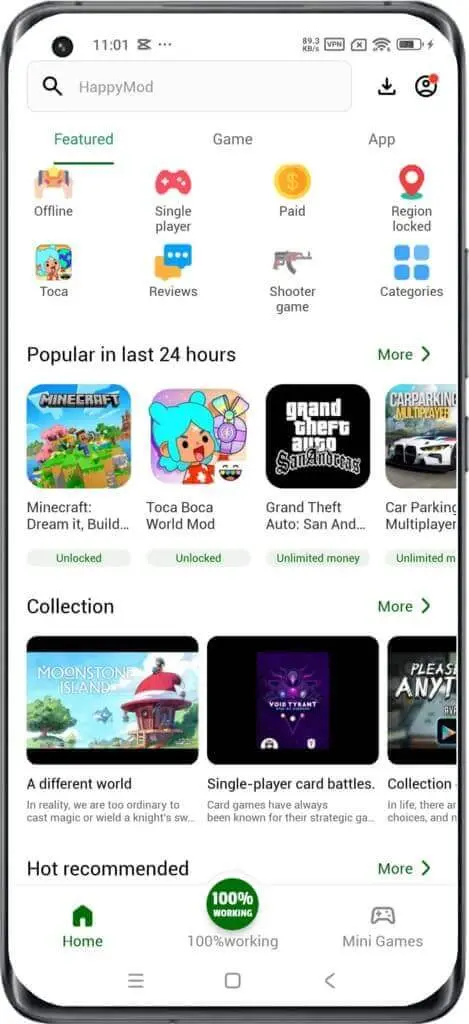
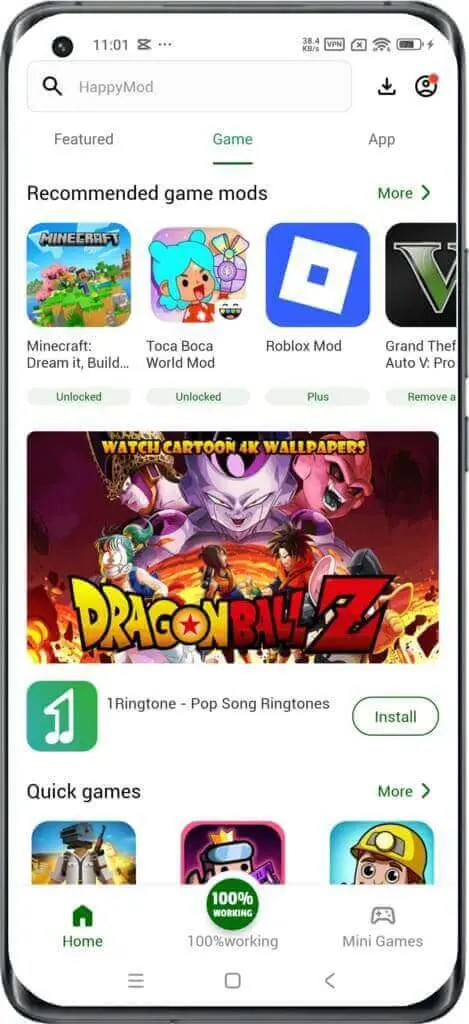
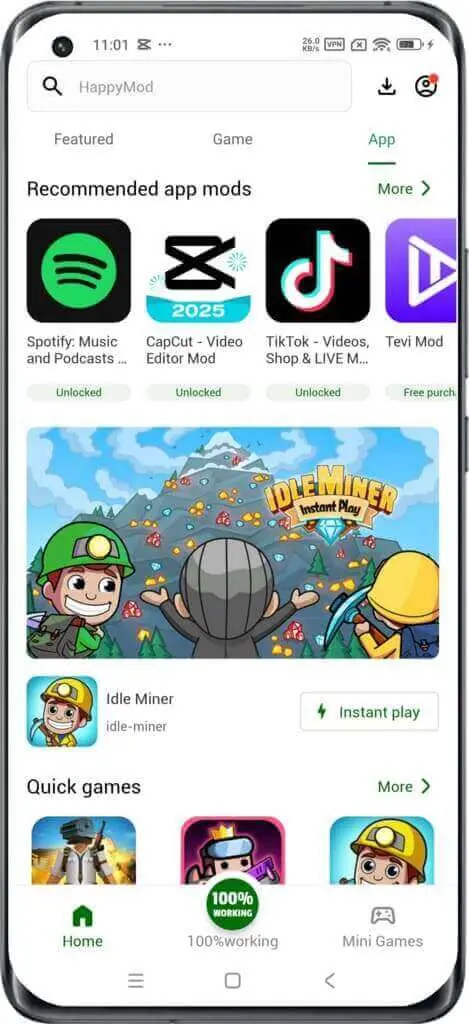
How to download and install Mod APK on HappyMod
- Launch HappyMod: Open the HappyMod App on your Android device.
- Find Your Mod: Use the search bar to find the specific game or app you want a mod for, or browse through the categories.
- Select a Mod Version:Once you find your desired app/g ame, you'll likely see several "MOD" versions available.
- Initiate Download: Tap on your chosen MOD version, then click the "Download" button.
- Automatic Installation (Post-Download): After the modded APK file finishes downloading within HappyMod, the installation process usually starts automatically.
- Initiate Download: Tap on your chosen MOD version, then click the "Download" button.
- Grant Installation Permission (if prompted): If it's your first time installing a MOD app from HappyMod
- Follow Prompts: Proceed by following any on-screen installation prompts.
- Enjoy: Once the installation is complete, the modded app or game will be ready to use on your device.
Smart Tips for Using HappyMod App
Enable "Unknown Sources" Temporarily
While necessary for installing APKs outside Google Play, consider disabling it immediately after installation if you're concerned about security, or only allow your trusted browser/file manager to install unknown apps (on newer Android versions).
Check Mod Popularity & Ratings
HappyMod often shows "working percentages" or user ratings/comments for each mod. Prioritize mods with high working percentages and positive feedback from the community. This indicates reliability and generally safer options.
Read Mod Descriptions (Mod Info)
Always read the "Mod Info" section carefully. This tells you what features have been modified (e.g., unlimited money, ads removed). Ensure the mod's features match your expectations and don't include anything suspicious.
Use Antivirus Software on Your Device
Even though HappyMod claims to scan files, having a reputable antivirus app on your Android device adds an extra layer of protection against potential malware.
Be Skeptical of "Too Good to Be True" Mods:
If a mod promises something extremely unusual or unrealistic, proceed with extra caution.
Search Efficiently
Use the search bar to find specific apps or games. Pay attention to alternative spellings if your initial search doesn't yield results.
Browse Categories & Trending Lists
Explore categories like "Games" or "Apps" and check "Trending" or "Featured" sections to discover new and popular mods.
Compare Mod Versions
For popular apps, HappyMod often lists multiple mod versions. Compare their "Mod Info" and "working percentages" to select the best one for your needs.
Consider Original APKs
HappyMod also hosts original APKs. If you only need a specific older version of an app or want a clean install without mods, you can opt for the original.
Requirements to Install HappyMod APK
| Operating System | Android 5.0 or higher |
| RAM Required | Minimum 100 MB |
| Storage Required | 200 MB of free space |
| Internet Required | An active internet |
Step-by-Step Guide to Download and Install HappyMOD APK
- Step 1: Download the HappyMOD APK File
- Step 2: Locate the Downloaded APK File
- Step 3: Install the HappyMOD APK
- Step 4: Complete the Installation
- Step 5: Enjoy The HappyMod App
May Permissions Required for HappyMod
When you install and use the HappyMod app, it will likely request certain permissions to function correctly, especially given its role as a third-party app store and installer. While the exact list can vary slightly with different versions of the app and Android OS, here are the most common and essential permissions HappyMod may require:
- 1.Storage / Photos / Media / Files (Read and Write External Storage):
- 2.Internet / Network Access (Full Network Access, View Network Connections):
- 3.Install Unknown Apps (System Setting, not a direct permission HappyMod requests but depends on)
- 4.Wi-Fi Connection Information (View Wi-Fi connections)
- 5.Device & App History (or similar permissions depending on Android version)
How to Update Your HappyMod APK
Updating your HappyMod APK is a straightforward process, primarily done through the app itself or by manually downloading the latest version. Keeping your HappyMod app updated ensures you have the latest features, bug fixes, and potentially improved security for the platform.
Method 1: Update Through the HappyMod App (Recommended)
- Open the HappyMod App
- Look for Update Notification
- Initiate Update
- Download and Install
Method 2: Manual Update (Downloading the Latest APK)
- Uninstall Current HappyMod (Optional but Recommended for a Clean Install)
- Enable "Unknown Sources" (if not already enabled)
- Download the Latest HappyMod APK
- Install the New APK
PROS
- Free Access to Premium/Unlocked Content
- User community
- Non-invasive ads
- Safe and secure downloads
- Fast Download Speed
- Different types of Mods
- Mod history version
CONS
- Some mods has risk of be banned
- Some mods cannot be installed on old android device
What Languages Does HappyMod APK Support?
HappyMod APK supports several languages for users worldwide. It usually matches the official HappyMOD app's language options. Check the mod version for the latest supported languages.
List of Supported Languages
Fully Supported Languages: These are available across the platform, including UI, customer support, and in-game experiences:
- English
- Spanish
- Brazilian Portuguese
- Russian
- Indonesian
- Arabic
- Turkish
Other Languages: These are supported in specific areas
- French
- German
- Italian
- Korean
- Japanese
- Chinese (Simplified and Traditional)
- Thai
- Polish
- Portuguese
- Indonesian
- Vietnamese
How to Change Language in HappyMod APK?
You can change the language in HappyMod APK through the settings menu. Go to Account Info and select your preferred language. Not all mods may support every language, so verify before downloading.
User's Reviews
GamerPro27
HappyMod is an absolute lifesaver for mobile gamers! I've been able to get unlimited coins and gems in so many games without spending a dime. The dowloads are fast, and I rarely run into mods that don't work. It'transformed how I play, no more tedious grinding, just pure fun. Highly reconmend for anyone looking to truly enjoy their games without limits!
AppExplorer
Pretty good app store for mods, I've found some amazing ad-free versions for my favorite productivity apps, which is a huge plus. The interface is clean and easy to navigate. My only minor gripe is the 'unknow source' setting, which can be a bit of a hassle to keep toggling, but I guess that's necessary. Voerall, solid performance for getting unlocked content.
Alision
HappyMod has its moments. I've successfully dowloaded a few mods that worked perfectly, especially for offline games. However, I've also had a couple of mods that crashed immediately or didn't deliver what theypromised, There's always that slight hesitation about security since it' s not Google Play, even though they claim to scan for viruses. Use with caution, but some gems can be foud.
Workstew
Honestly, not impressed, I dowloaded a mod for an online game, and my account got banned almost inmediately, They don't make it clear which mods are safe for online play. Plus, some of the APKs I tried seemed to have even more ads than the original, or just didn't install correctly. It feels like a ganble every time.
Edwards
This is the best place to find obscure or older modded versions! I was looking for a specific mod for an older version of an app that isn't available anywhere else, and HappyMod had it. The community conments are super helpful for figuring out which mod works best. It's a fantastic resource if you know exactly what you' re looking for and want to bypass the usual app store limitations.
Conclusion:
In conclusion, HappyMod stands as a prominent third-party app store specifically for Android users, distinguished by its extensive collection of modified (MOD) versions of apps and games. It primarily serves users seeking enhanced experiences, such as unlocked premium features, ad-free gameplay, or in-game advantages, all typically available for free. Its key appeal lies in offering a vast and diverse library of mods that are often difficult or risky to find elsewhere, presented through a user-friendly interface that simplifies the download and installation process. HappyMod attempts to mitigate the inherent risks of unofficial sources by claiming to implement manual testing and antivirus scanning for its uploaded content, and by leveraging community feedback for mod reliability.
FAQS-FREQUENTLY ASK QUESTION
What is HappyMod?
HappyMod is a popular third-party app store for Android users, specializing in providing modified (MOD) versions of apps and games. It offers a vast collection of MODs that are tested by editors.
Is HappyMod safe to use?
HappyMod is very safe. The Mods on HappyMod are manually tested by editors and scanned with over 50 antivirus programs to ensure security. All apps are checked for viruses before being included on the platform, and the content is constantly verified.
What are the system requirements for HappyMod?
Your device must be running Android 4.0 or above and have at least 100 MB of free space to download and install the app.
Can I download HappyMod on iOS devices?
No, the HappyMod App is only available on Android devices. Any HappyMod iOS app you might encounter could potentially contain viruses.
Are the modded APKs on HappyMod ads-free?
Yes, most of the modded apps available on HappyMod have had ads removed, allowing for an ad-free experience.
Why Users Need HappyMod App?
Users need it for free access to premium content, an ad-free experience, enhanced gameplay, to bypass restrictions, find older versions of apps, and as a centralized/safer source for mods.
How to Update Your HappyMod APK?
You can usually update it directly through the HappyMod app by looking for an "Update" option in its settings, or by manually downloading the latest APK from their official website and installing it.